Heilyn Script Font: Elevating Digital Brand Identity
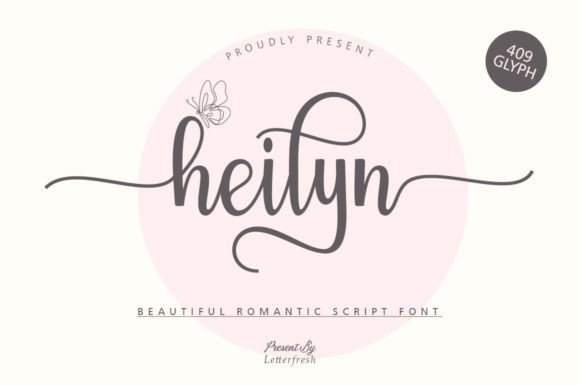
I was staring at a blank Figma canvas, trying to decide on the typography for a new boutique skincare brand’s landing page. The design needed to feel luxurious but approachable, elegant yet modern. I had my sans-serif body copy locked in—a clean, geometric typeface that handled readability perfectly—but the hero section felt sterile. It lacked soul. That’s when I pulled up Heilyn, a dazzling script font that immediately changed the entire mood of the layout.
As a web designer, I am constantly searching for typefaces that bridge the gap between artistic expression and digital functionality. Heilyn is not just another decorative font; it is a carefully crafted asset that brings a sense of refined movement to screen-based designs. In this walkthrough, I’ll share how I integrated Heilyn into a real-world project, what I learned about its performance on various devices, and why it might be the missing piece in your own digital product library.
The First Impression: Hero Section Testing
The first test for any display font is always the hero section. This is where users form their initial impression of trust and aesthetic quality. I dropped Heilyn into the main headline area, overlaying it on a soft, blurred background image of natural ingredients. The result was striking. The font’s neat craftsmanship and high level of detail allowed it to hold its own against the visual noise of the background without becoming illegible.
Unlike many script fonts that become muddy or hard to read at larger sizes, Heilyn maintains clarity. Its ligatures are smooth, and the stroke weight feels balanced—neither too thin to disappear on high-resolution mobile screens nor too heavy to overwhelm the composition. For a brand identity that wants to convey premium quality, this balance is crucial. It signals professionalism while retaining a human, hand-crafted touch.
Visual Hierarchy and Scanning Behavior
In web design, we often talk about the "F-pattern" or "Z-pattern" of user scanning. A well-placed script font can disrupt this pattern in a positive way, drawing the eye exactly where you want it. When I used Heilyn for the primary call-to-action (CTA) text or a short sub-headline, it acted as a visual anchor. However, I quickly learned that restraint is key. Because Heilyn is so visually engaging, using it for long paragraphs would fatigue the reader. Instead, I reserved it for:
- Main headlines and hero titles
- Section dividers or pull quotes
- Short, impactful phrases in promotional banners
- Logo accents or wordmarks for creative businesses
This strategic placement ensures that every time a user encounters Heilyn, it feels intentional and special, rather than repetitive and cluttered.
Readability Across Devices
One of the biggest challenges with script fonts in UI design is responsiveness. I tested Heilyn across different breakpoints, from large desktop monitors down to compact smartphone screens. On desktop, the font shone, allowing users to appreciate the subtle curves and detailed terminals of each letter. But on mobile, things got tricky.
When scaled down below 16 pixels, some of the finer details began to blur. To mitigate this, I adjusted the tracking (letter-spacing) slightly and ensured the contrast between the text color and the background was high. For dark mode interfaces, I found that Heilyn performed exceptionally well against deep charcoal or navy backgrounds, offering a sleek, editorial look. On light backgrounds, a soft black or dark gray worked best to maintain warmth without harshness.
If you are planning to use Heilyn for buttons or small navigation elements, I recommend caution. While it looks beautiful as a standalone element, it may not be the most accessible choice for interactive states like hover or focus unless you provide clear visual cues. It is best suited for static display purposes where legibility is prioritized over interactivity.
Font Pairing Strategies
No font exists in isolation. To make Heilyn work effectively in a full website layout, pairing it correctly is essential. My go-to strategy is to let Heilyn play the role of the "star" while supporting it with a neutral, highly readable typeface for body copy.
I paired Heilyn with a simple sans serif font like Inter or Lato for paragraph text. This combination creates a harmonious contrast: the script adds personality and flair, while the sans serif provides structure and ease of reading. For a more editorial or traditional brand voice, I also experimented with a classic serif font for body copy. This pairing feels sophisticated and timeless, perfect for luxury goods, wedding planners, or high-end coaching websites.
Avoid pairing Heilyn with other decorative or handwritten fonts. The competition for attention will be too high, resulting in a chaotic visual experience. Let Heilyn be the unique voice in a room of calm, professional speakers.
Enhancing Brand Trust and Consistency
Typography is a silent ambassador for your brand. Using a cohesive type system, including a distinctive script like Heilyn for headers, helps establish consistency across all digital touchpoints. Whether it’s an email newsletter, a social media graphic, or a course sales page, seeing Heilyn repeatedly reinforces brand recognition. It tells the user that this business pays attention to detail and cares about aesthetics. This perceived polish can significantly impact user engagement and conversion rates, as visitors are more likely to trust a brand that presents itself professionally.
Practical Applications Beyond Web Design
While my focus here is web design, Heilyn’s versatility extends to other digital assets. I have successfully used it in:
- Digital Product Templates: Adding Heilyn to Canva templates or Notion dashboards gives them an instant upgrade in perceived value.
- Social Media Ads: Short, punchy headlines in Instagram or Facebook ads benefit from the immediate visual impact of a script font.
- Email Headers: A custom script header in an email campaign can increase open rates by standing out in a crowded inbox.
- Portfolio Sites: For creatives, using Heilyn in a portfolio title page showcases artistic taste before the visitor even sees the work.
Technical Considerations for Implementation
Before adding Heilyn to your project files, there are a few technical checks to perform. Ensure you have the correct file formats, such as WOFF2 for optimal web performance. Check the included styles to see if there are multiple weights or alternates available; having access to alternate characters can add extra flavor to specific words or logos.
Also, verify the commercial license. If you are using Heilyn for client projects, online stores, or commercial advertisements, make sure your license covers these use cases. Proper licensing protects both you and the font creator, ensuring ethical use of design assets.
Final Integration Tips
Integrating a premium script font like Heilyn is less about technical complexity and more about thoughtful application. Start small. Test it in one hero section. See how it interacts with your existing brand colors. Adjust the sizing and spacing until it feels right. Once you find that sweet spot, you will notice a tangible improvement in the overall polish of your digital presence. Heilyn is more than just a font; it is a tool for storytelling, helping you communicate elegance, creativity, and care in every pixel.